Editpad Vs. ProWritingAid: Reviewing and Testing Similar Writing Tools

There are dozens of dedicated platforms available online that claim to simplify the writing process. Two names that stand out as the most popular options are Editpad and ProWritingAid.
Both tools have gained popularity among students, teachers, researchers, marketers, bloggers, and writers. Editpad emphasizes content creation, text refinement, proofreading, and much more. On the contrary, ProWritingAid is designed as a dedicated writing assistant offering a range of tools.
But which one deserves a place in your writing workflow? Don’t worry, we will help you decide.
In this blog, we are going to compare Editpad and ProWritingAid by taking a detailed look at their different writing tools.
Editpad is primarily known for its free online notepad. Besides this, it offers a wide collection of AI writing tools, including a paraphraser, summarizer, plagiarism checker, and grammar checker.
These tools not only help streamline the writing process but also elevate the overall content quality. The good thing is that all tools have a free version available and support multiple languages for a global audience.
ProWritingAid offers a wide range of online tools that heavily focus on content enhancement, in-depth grammar analysis, and style improvement. It is widely used by authors, editors, and long-form writers.
Moreover, it provides content analysis to help users enhance content quality and their writing skills.
In this section, we are going to briefly review and test similar writing tools offered by both Editpad and ProWritingAid. So that you can better spot the differences between them.
Description: Editpad paraphrasing tool is powered by AI technologies to effectively restructure content in an improved way by changing word choice and sentence structure. It aims to make the entered text unique, clear, and fluent to read.
Key features:
9 paraphrasing modes (8 general +1 custom)
Supports multiple languages
Option to further rephrase sentences in the output
Testing:
To evaluate Editpad's paraphrasing capabilities, we are going to rephrase a sample product description. Let’s see how the tool responds.
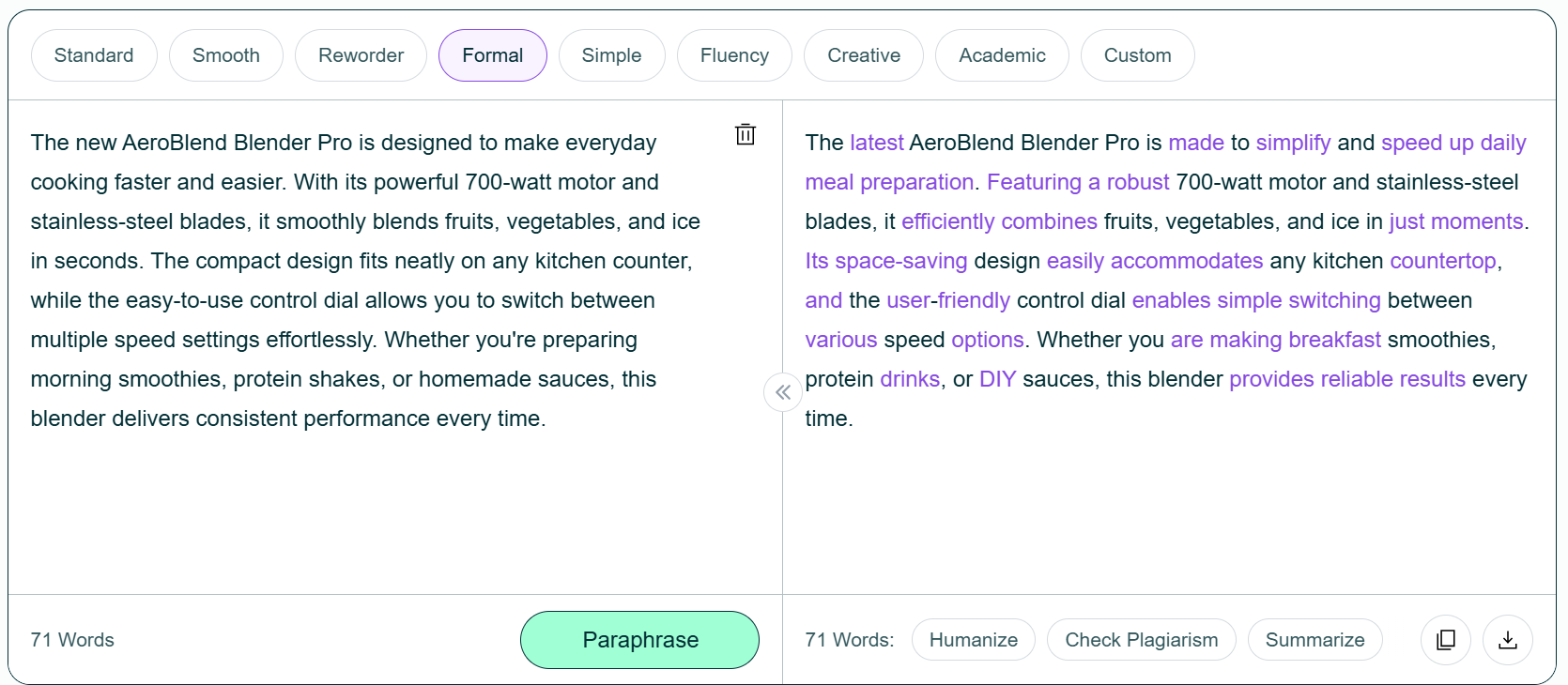
As can be seen in the above picture, the paraphraser has produced a better version by using niche-relevant wording such as “Space-saving,” “Accommodates,” “DIY,” and more. The output is simple, engaging, and professional.
Description: ProWritingAid paraphraser also works to rephrase the given content in a new way while preserving the main intent. It replaces words and modifies the sentence structure by rearranging words or changing voice from active to passive and vice versa.
Key Features:
Offers 10 writing modes
No sign-up required
Can be added to Chrome for free
Testing:
Now, we are going to process the same product description through the ProWritingAid paraphraser. Here’s how the tool responded:
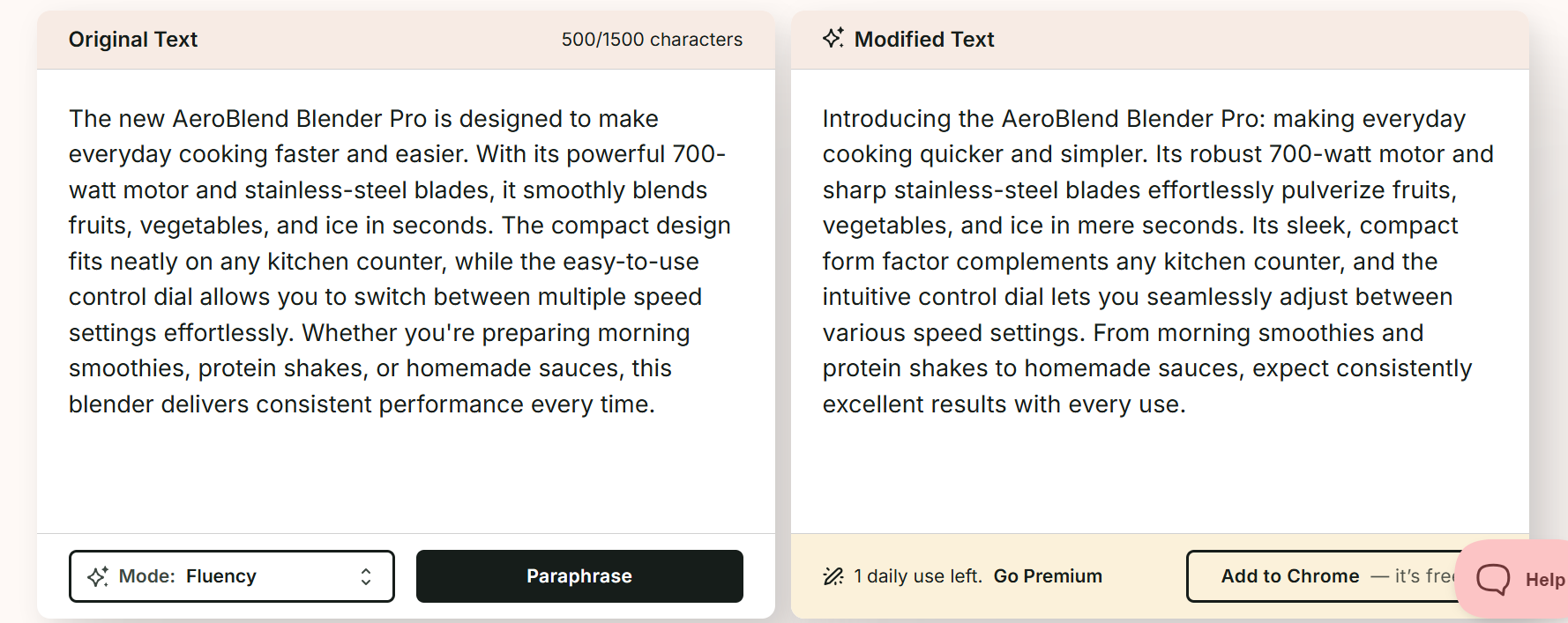
Although the tool has produced a new version, it has used some technical jargon such as “Pulverize” and “Form factor.” The output also feels AI-generated rather than natural, unlike Editpad's version.
| Which Tool Performs Better? Editpad paraphraser takes the lead in terms of both working and features. It paraphrases text naturally, offers an option to rephrase sentences further in the output, support for different languages, and a 1,000-word limit for free users. Such features aren’t provided by ProWritingAid. |
Description: Editpad Summarizer precisely condenses lengthy text in seconds by only using the important information. During the summarization process, it retains both the quality and primary context of the source text.
Key Features:
Advanced AI summarization mode
Option to adjust summary length
Get output in different formats (paragraphs, bullets, or custom)
Testing:
We are going to summarize a 206-word passage through this Summarizer. Let’s see how it goes:
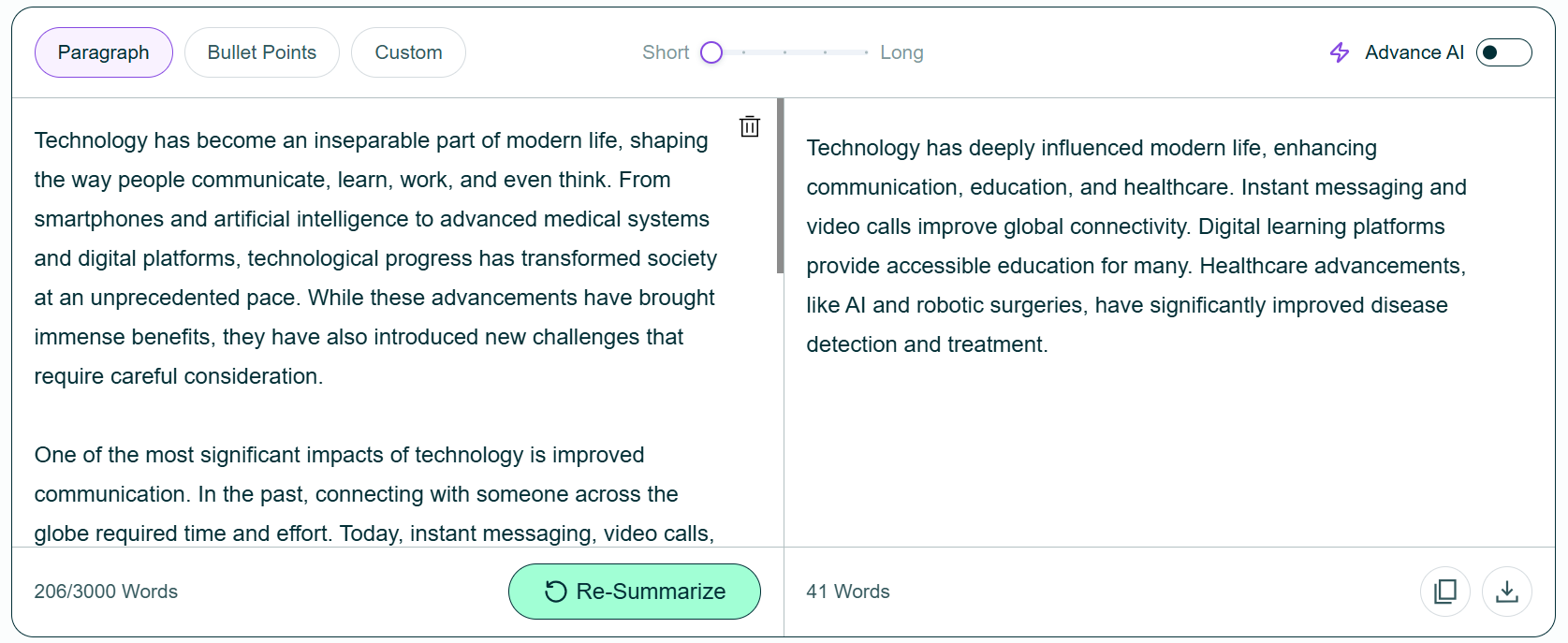
As expected, the Summarizer generated a concise summary (41-words) by only using key information. It also introduced new and more contextually appropriate words in the output to elevate the summary quality.
Description: ProWritingAid summarizer effectively converts the given text into a summarized version with a single click. Unlike Editpad, it does not allow you to adjust summary length or get output results in different styles.
Key Features:
Simple to use
Highly quick and accurate
Retains original meaning
Testing:
Now, let’s verify the summarization capabilities of ProWritingAid by processing the same text used in the previous test.
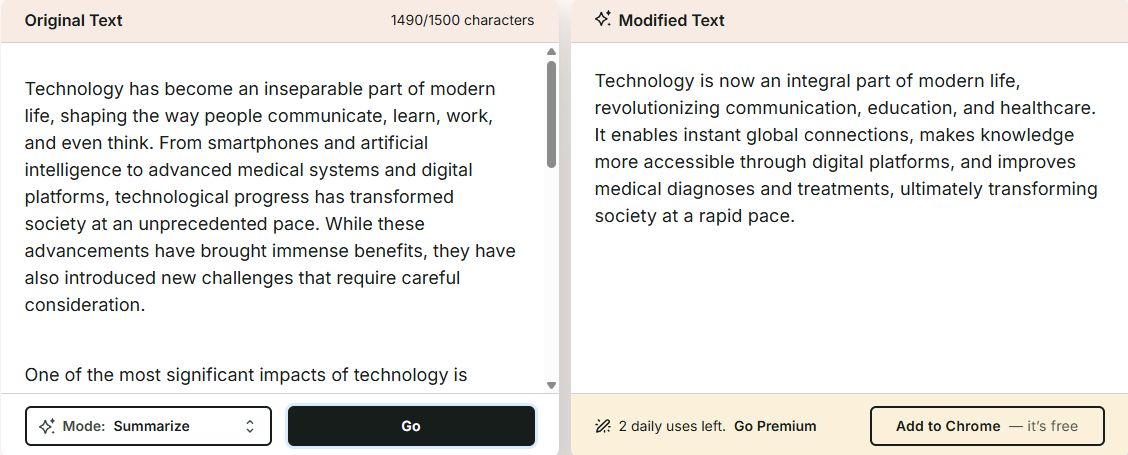
Although ProWritingAid has produced a concise version, there are a few issues with it. First, it has tried to cover everything in a single sentence, impacting readability. Just look at the length of the second sentence.
Secondly, while trying to be concise, the tool has missed some important phrases. Compare the output with that of Editpad Summarizer to better understand the differences in sentence connectivity, flow, and coherence.
| Which Tool Performs Better? Based on the test, Editpad has a better text summarizer compared to ProWritingAid. Additionally, prominent features such as the summary length adjuster, language support, etc., are also missing in ProWritingAid’s summarizer. |
Description: Editpad AI grammar checker effectively scans the given content to find and highlight grammar, spelling, and punctuation mistakes. It also provides useful suggestions to quickly correct typos. You can either fix the errors one by one or use the “Fix All” button; the choice is yours!
Key Features:
Detect all types of grammar, spelling, and punctuation errors
Highlight mistakes in different colors
Capable of proofreading text in multiple languages
Testing:
To determine how accurately this tool proofreads the text, we are going to scan a text containing numerous mistakes.
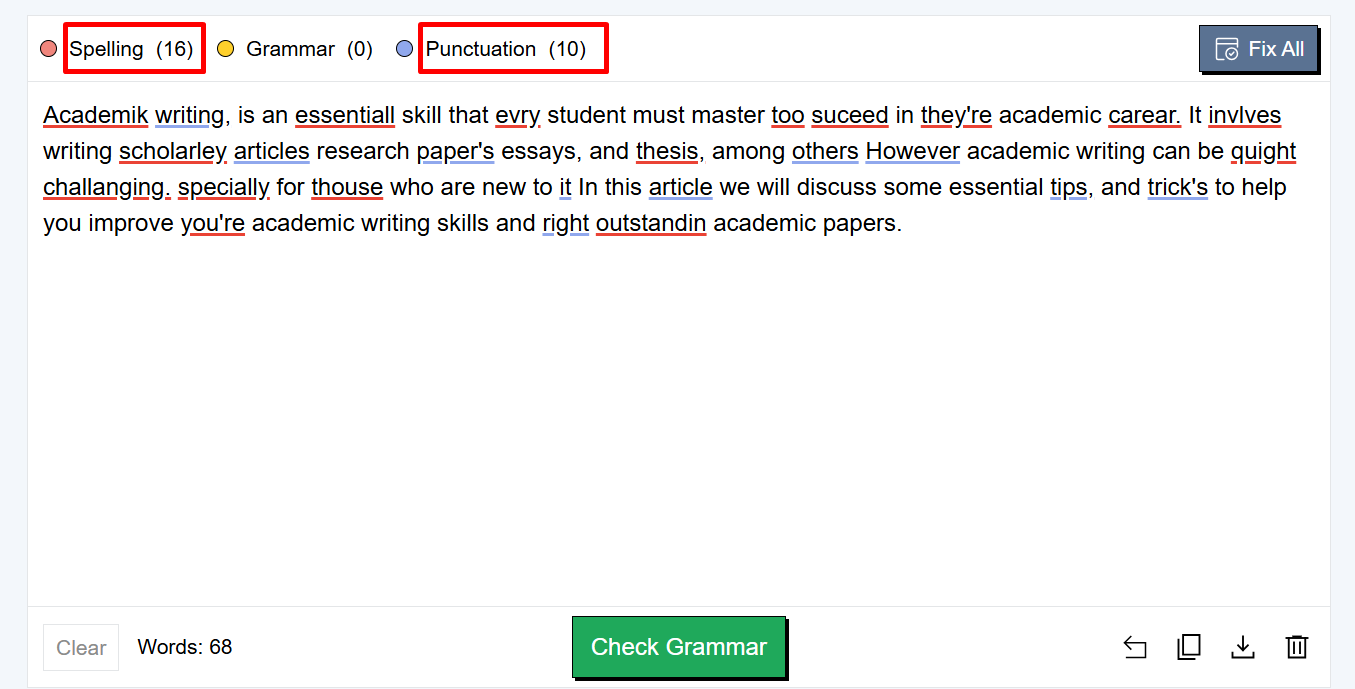
As you can see, the tool has identified a total of 26 errors and underlined them in different colors. All you need to do is simply click on the mistake, and a menu will appear displaying the correction.
Description: ProWritingAid grammar checker proofreads text quickly to identify and correct all types of grammatical mistakes. Just like Editpad, it also highlights errors in different colors for user ease.
Key Features:
Check for errors in different English variants (US, UK, AU, and CA)
Underlines mistakes in different colors
Seamless error correction
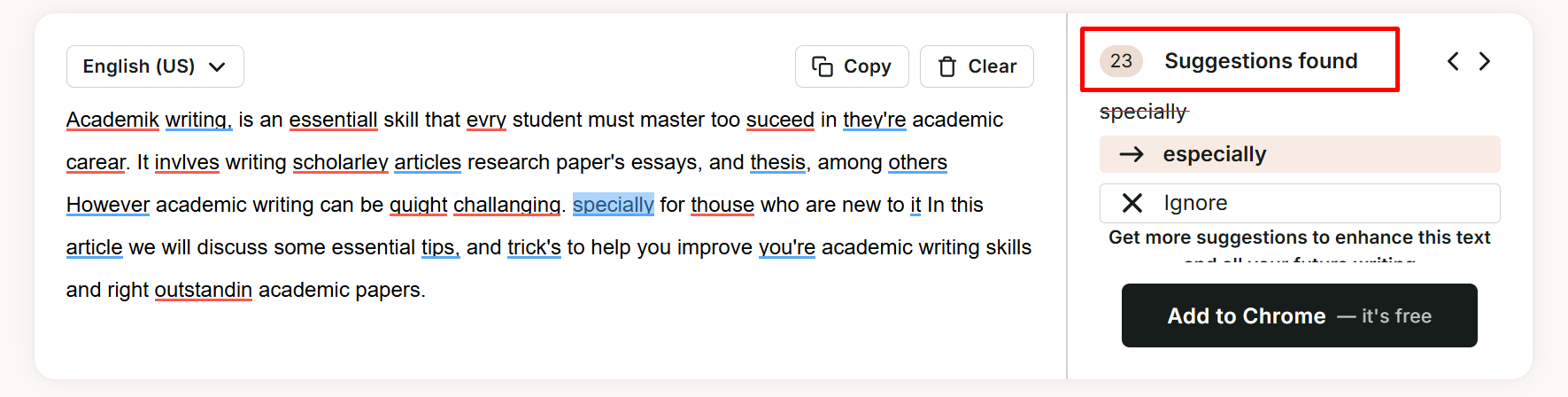
So, ProWritingAid has detected 23 mistakes, while there are actually 26 typos (detected by the Editpad grammar checker). This clearly means there is a margin of error in this tool.
| Which Tool Performs Better? It’s obvious: the Editpad AI grammar checker has the upper hand. It has identified 26 mistakes, while ProWritingAid was able to detect only 23. |
Description: Editpad offers an advanced plagiarism checker that scans the entered text against millions of already published resources to find similar sentences. If any matches are found, the tool highlights them along with the matched source.
Key Features:
1,000-word limit in free version
Mentions the percentage of both unique and duplicate content
Download and share the plagiarism scan report
Testing:
We are going to scan a mix of unique and duplicate content through this plagiarism checker. Let’s see how it will provide the results.
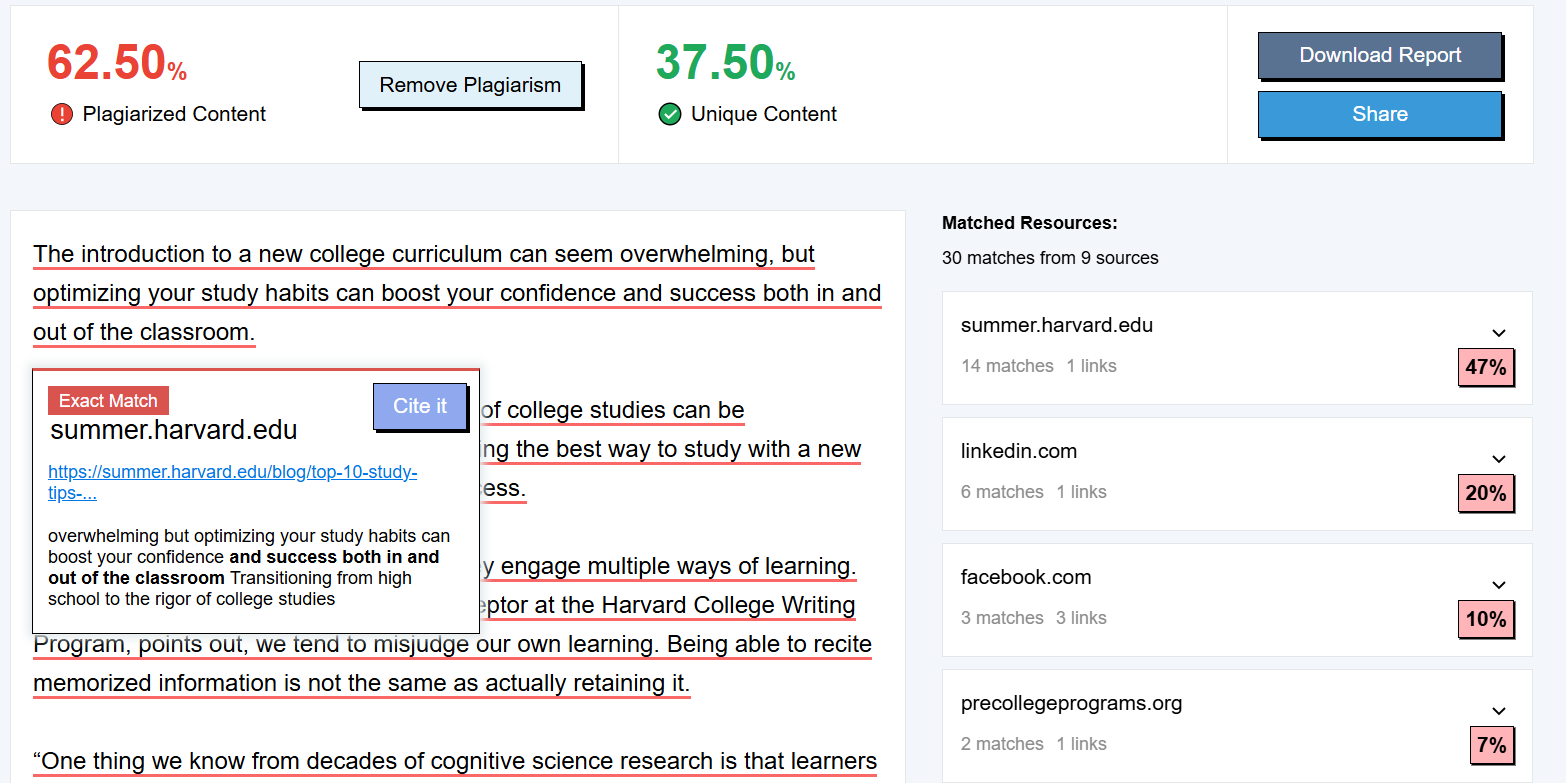
So, the plagiarism checker has effectively detected and highlighted the duplicated content along with matched sources.
Description: ProWritingAid plagiarism checker helps users ensure whether their content is original or plagiarized. It scans the content against online sources to identify copied sentences.
Key Features:
Deep scanning feature
2,000 words per check
Percentage of original and non-original content
Testing:
Note that the ProWritingAid plagiarism checker is a paid tool. That’s why we are only attaching a screenshot of its results so that you can have a better idea about its working.
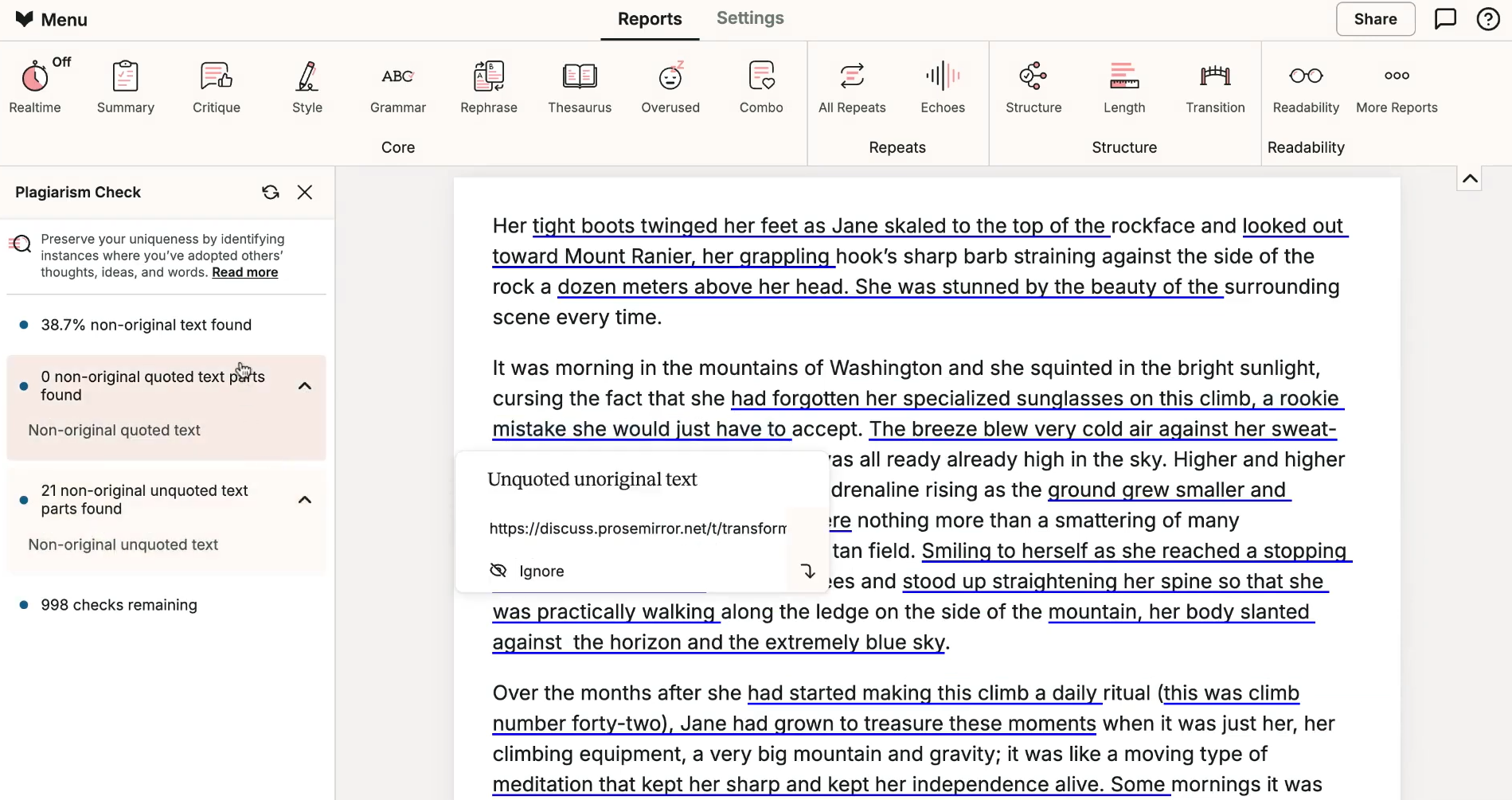
The ProWritingAid plagiarism detector has highlighted non-original quoted and unquoted text (which is actually plagiarism) along with the matched source.
| Which Tool Performs Better? Both tools are good at plagiarism detection. When it comes to accessibility and features, Editpad leads the way. It is free, easily accessible, and allows users to share and download the scan results. |
Description: Editpad sentence rewriter helps restructure sentences in unique ways while keeping the original meaning intact. It provides the option to select tone and the number of rewritten variants the tool should produce against the input.
Key Features:
Simple and free to use
Rewrite sentences in numerous tones/styles
Select the number of rewritten variants you want to generate
Testing:
We are going to rewrite a simple sentence using a “Professional” tone. A total of 3 variants will be generated; here are the results.
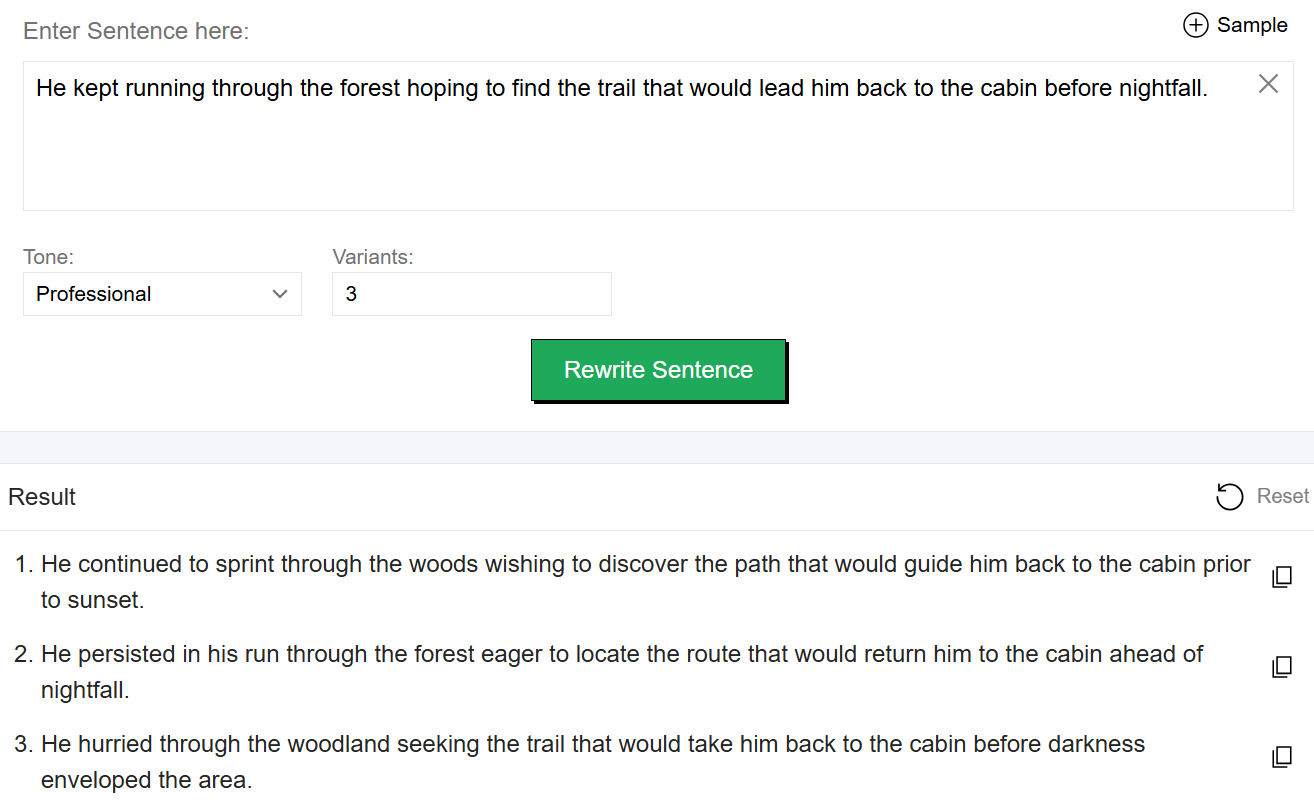
The tool produced rewritten variants in a professional tone by using sophisticated wording such as “Sprint,” “Prior,” and “Persisted.”
Description: ProWritingAid sentence rephraser allows you to generate multiple unique and engaging versions of a single sentence. It also offers multiple modes that can be used to tailor the tone of rewritten sentences into different styles.
Key Features:
Simple to use
Multiple rephrasing modes
Generates numerous versions for a single sentence
Testing:
We are going to rephrase the same sentence using the “Formal” mode of ProWritingAid’s sentence rephraser. Let’s see how it comes up with reworded versions.
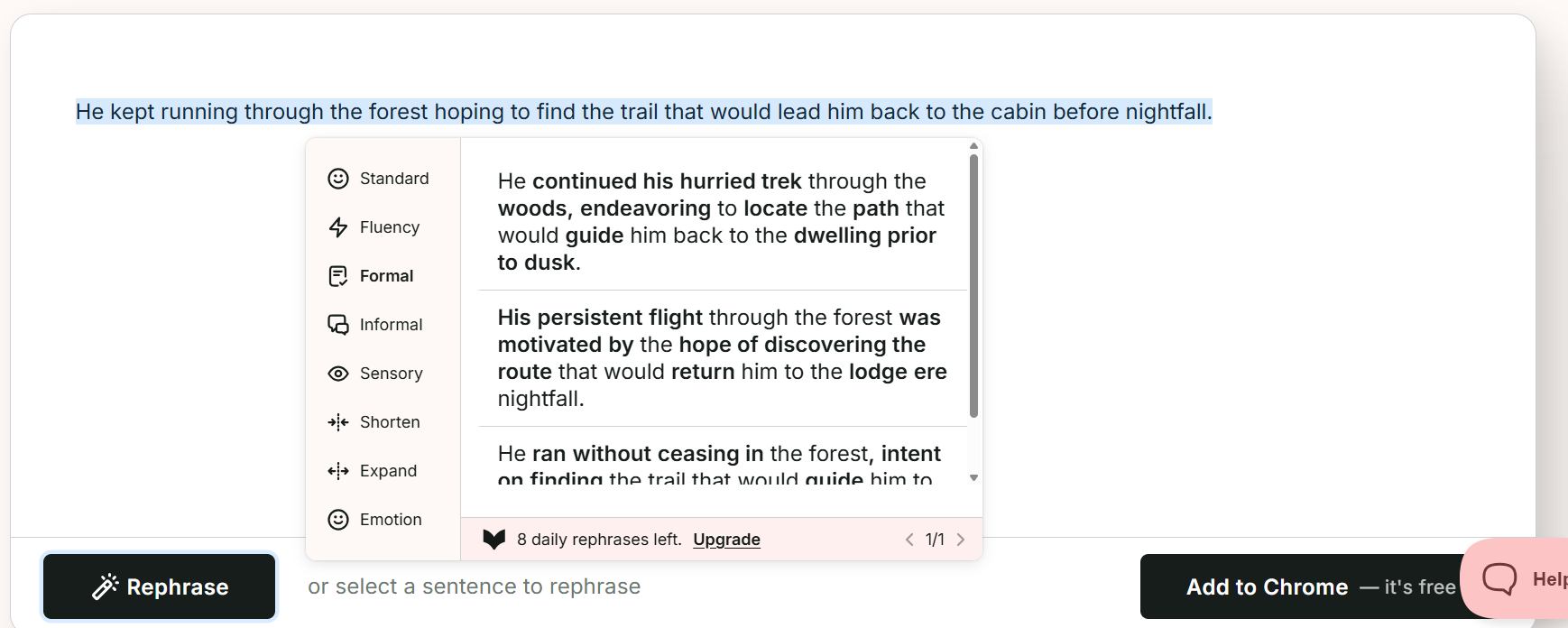
Although the tool has produced rephrased versions, it has used overly technical words such as “Trek,” “Endeavoring,” and more. These may damage the clarity, making it difficult for readers to understand the core idea.
| Which Tool Performs Better? Technically, both tools are good at sentence rephrasing. However, ProWritingAid often uses technical jargon, especially in Formal mode, impacting the overall readability. |
Aspect | Editpad | ProWritingAid |
Primary Purpose | All-in-one writing platform for content creation, editing, and optimization | Advanced writing assistant focused on style, grammar, and writing improvement |
Best For | Students, bloggers, marketers, researchers, and general writers | Authors, editors, novelists, and content creators |
Free Access | Most tools available with generous free usage | Limited free access; many advanced features require a paid plan |
Language Support | Supports multiple languages across various tools | Primarily focused on English-language writing |
Overall Value | Strong value for users seeking a free, versatile writing toolkit | Better suited for writers seeking in-depth writing analysis and feedback |
When comparing Editpad Vs. ProWritingAid, the better choice is the one that best meets your writing needs and personal preferences.
If you are looking for a versatile platform that offers paraphrasing, summarizing, plagiarism detection, grammar checking, and other writing utilities, Editpad is a stronger choice. Its tools are simple, free, and support multiple languages. Additionally, Editpad’s tools also delivered satisfying results throughout our testing.
ProWritingAid, on the other hand, is a decent choice if you want to rephrase, summarize, and proofread content occasionally. This is because its tools come with word and daily usage restrictions for free users.








 Editpad
 Premium

 Chat Online
