
Whether you are a student, professional, or content writer, choosing the right writing assistant can make a big impact on your productivity and writing quality. With so many options available, Editpad and LanguageTool stand out as prominent choices to refine grammar, style, and overall writing.
But which one best fits your writing needs? This question frequently comes to the users’ minds.
In this post, we’re going to evaluate Editpad and LanguageTool in detail. We’ll do an in-depth comparison of their key features, accuracy, integrations, and versatility. By the end, you’ll be able to make an informed decision.
Editpad | LanguageTool |
Editpad originally started as a straightforward online text editor and notepad. Gradually, it evolved into a comprehensive suite of AI tools. Now, it has become a one-stop solution for various writing needs. | LanguageTool is primarily a multilingual grammar, spelling, and punctuation checking tool. Later on, it added a paraphrasing tool to refine already written content. |
Editpad focuses on generating content, proofreading drafts, and refining text. For each purpose, it provides dedicated AI tools including Paraphrasing Tool, Text Summarizer, AI Text Generator, Grammar Checker, Plagiarism Checker, and others. | Unlike Editpad, LanguageTool is not a complete writing toolkit; it mainly concentrates on grammar and writing style correction. |
Let’s compare the similar features of Editpad and LanguageTool side by side to understand their strengths and weaknesses.
Editpad offers an AI-powered Grammar Checker that contextually checks grammatical, spelling, and punctuation errors. When content is passed through the tool, it highlights mistakes in different colors. This way, it helps users identify and correct their mistakes without any confusion.
One particularly useful feature of Editpad’s Grammar Checker is the “Fix All” option, which allows users to fix all the errors instantly with a single click. It is a beginner-friendly tool that works without forcing users to sign up.
LanguageTool Grammar Checker is a multilingual tool supporting more than 30 languages. Like Editpad, it is also an AI-supported tool and goes beyond surface-level grammar and spelling checking. Plus, it catches tone issues, structural inconsistencies, and language-specific errors.
Its unique feature is “Picky Mode,” which lets users identify and correct advanced punctuation, style, and spelling mistakes.
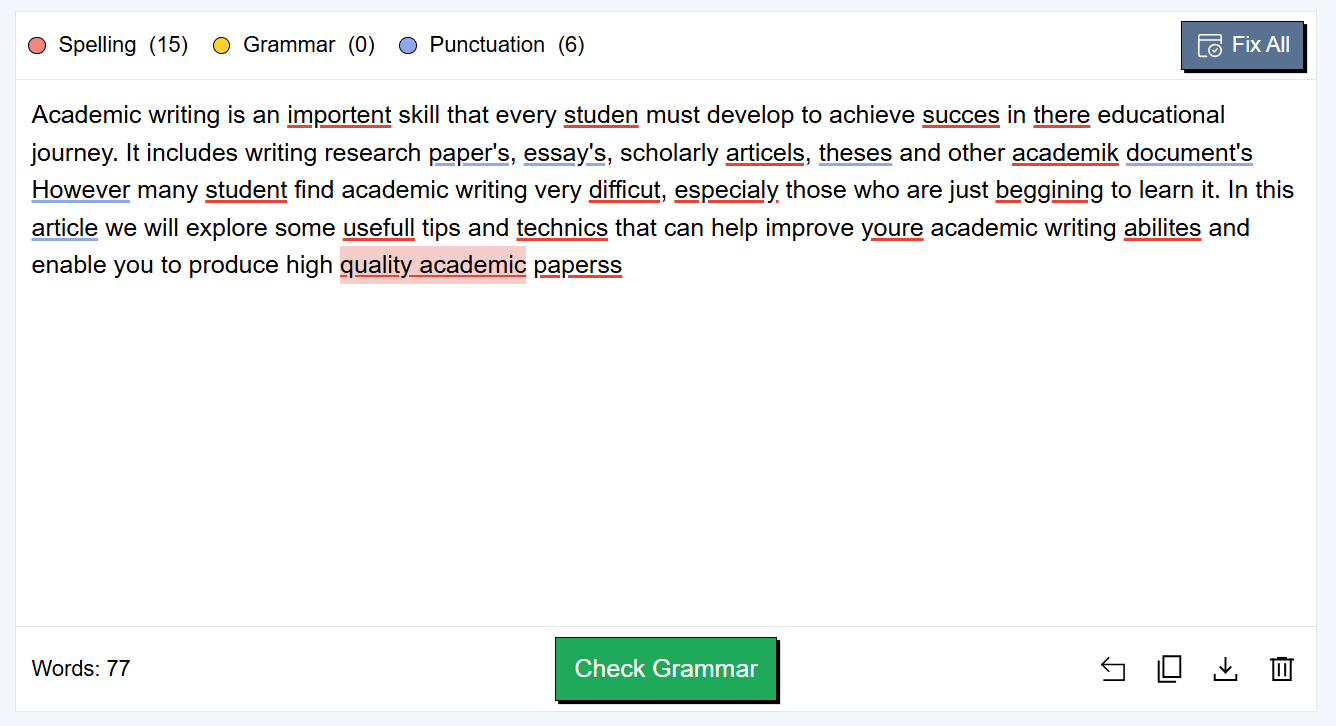
To evaluate the working of both tools, we pasted a sample text containing 22 mistakes. Editpad detected all 22 errors in our test. We just clicked the “Fix All” button and corrected everything.
Result of Editpad’s Grammar Checker:
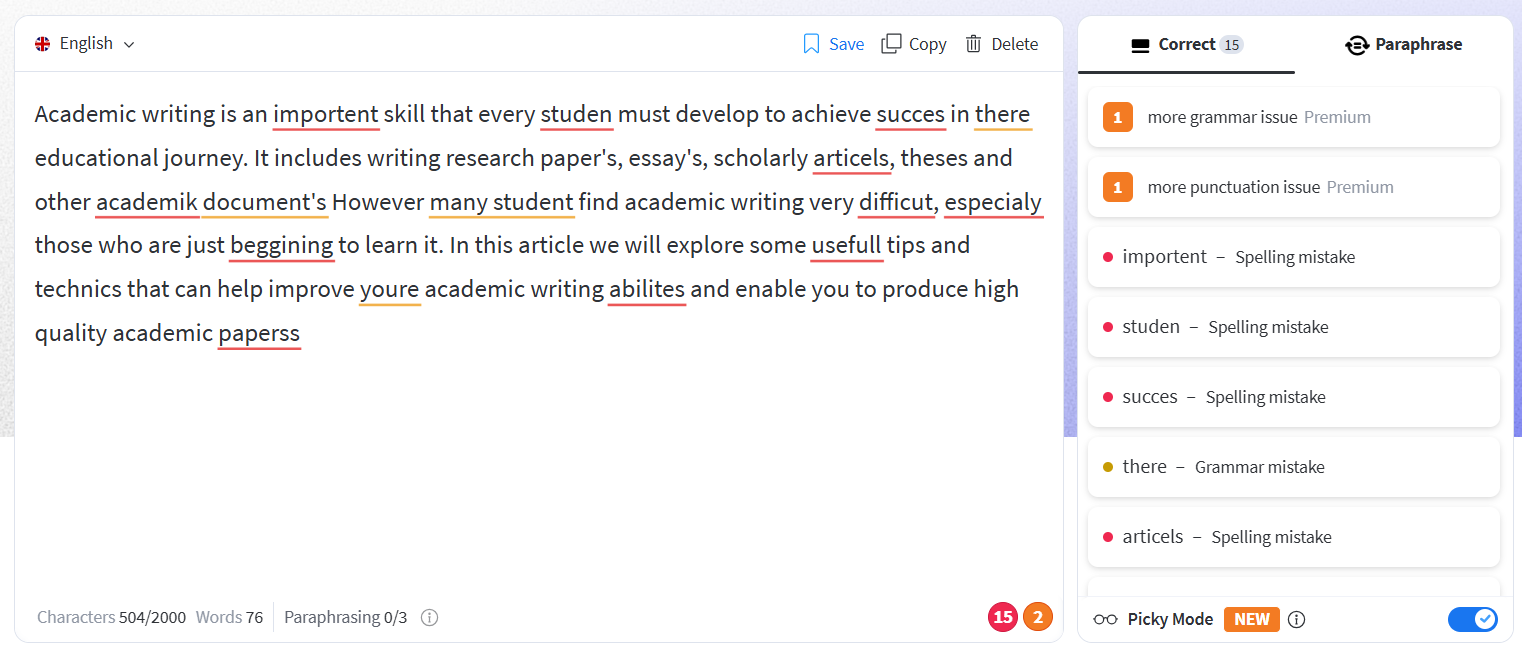
However, when the same text was tested in LanguageTool, it detected only 15 out of 22 errors and missed even some major mistakes (as shown in the image below). Also, we didn’t find any Fix All like feature in the LanguageTool. We had to click each error and accept its correction manually, which took a long time.
Result of LanguageTool Grammar Checker:
Features | Editpad | LanguageTool |
Freemium | ✔️ Yes | ✔️ Yes |
Grammar Checking | ✔️ Advanced Contextual Accuracy | ❌ For Basic Checking |
Supported Languages | ❌ 4 Languages | ✔️ 30+ Languages |
Free Usage Limit | ✔️ Up to 1000 words | ❌ Up to 2000 characters |
Highlights Errors | ✔️ Yes | ✔️ Yes |
One-Click Fix | ✔️ Available (Fix All) | ❌ Not available |
Picky Mode | ❌ No | ✔️ Yes |
Supported Files | ✔️ PDF, TXT, & DOCX | ❌ DOCX only |
From the above comprehensive comparison of Editpad’s Grammar Checker and LanguageTool, Editpad performed better in both testing and feature availability. As per our experience, Editpad is more suitable for users who prefer accuracy, faster correction, and simplicity.
However, for those who prefer multilingual grammar correction, LanguageTool is better as it comes with broader language support (30+ languages) as compared to Editpad.
The second tool that both platforms offer is Paraphraser. Let’s see which one is better at paraphrasing.
Paraphrasing Tool by Editpad helps you paraphrase your content using new and more appropriate words and sentences. It creates a completely fresh version with improved readability and fluency. One standout feature of the tool is that it lets users rephrase the output again. Whether you need to rephrase a specific sentence or the whole text again, Editpad will do it.
Additionally, Editpad’s Paraphrasing tool supports over 35 languages and comes with 12 predefined modes. Each mode rephrases your text differently. You can select any tone as per your audience, and the tool will modify your content accordingly.
LanguageTool’s Paraphrasing Tool allows users to rephrase text into 10 different styles. Using AI models, it accurately revamps content into a refined version. Similar to Editpad, it also lets you paraphrase your text again if you’re not satisfied with the first output.
This paraphrasing tool is also multilingual, like that of Editpad, but it supports only 6 languages.
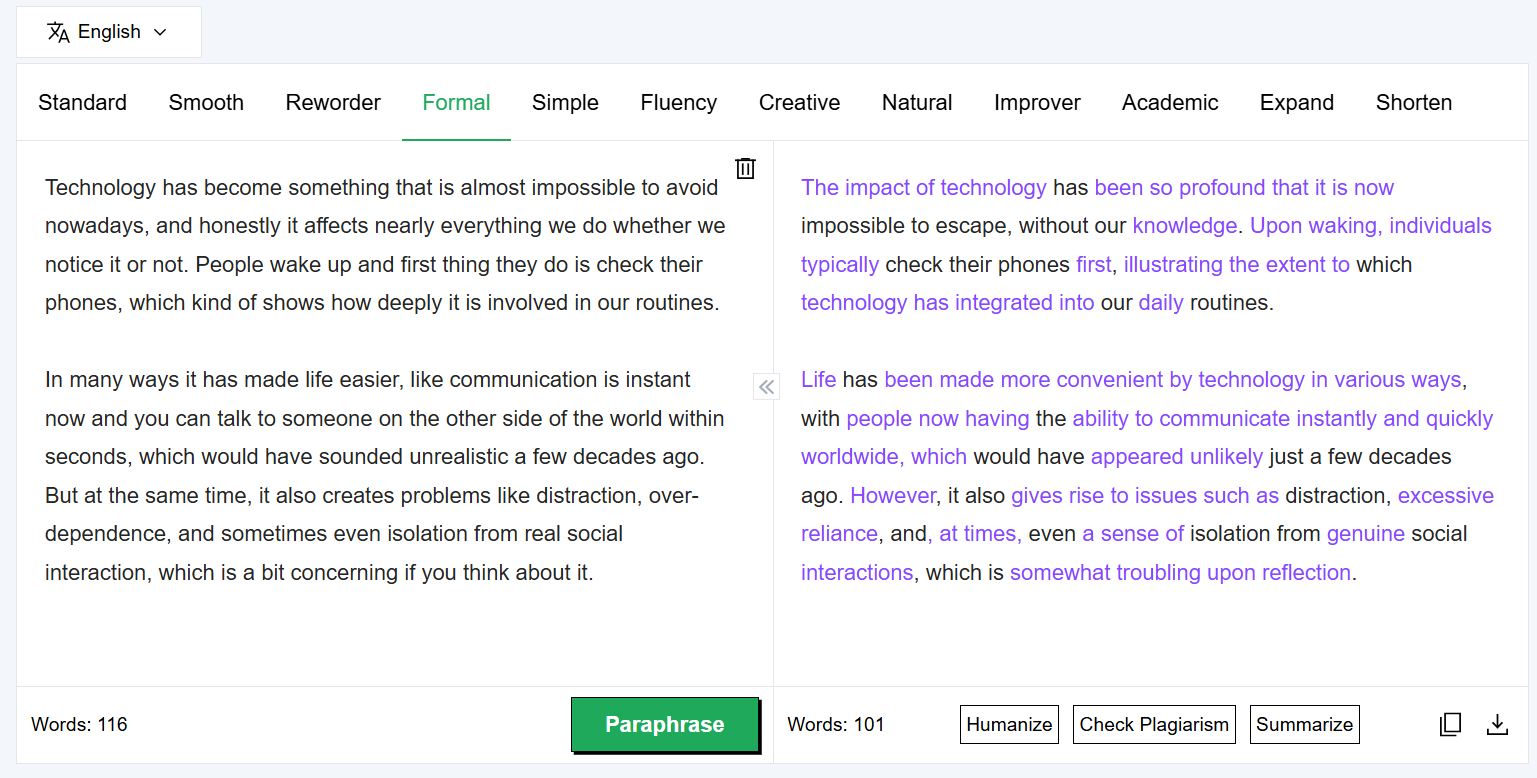
To test the working of both tools, we paraphrased a complex and inconsistent text through both tools one by one. Editpad made big changes to the content by replacing maximum words and re-structuring almost all the sentences. As a result, it provided a fully polished text with better readability, clarity, and engagement.
You can see changes as highlighted sections in the image below;
Paraphrasing by Editpad:
On the other hand, LanguageTool’s Paraphraser also did a good job. However, it just swapped some words, as you can observe from the highlighted text in the image. Plus, some of its synonym replacements are complex and feel less natural in context.
Paraphrasing by LanguageTool: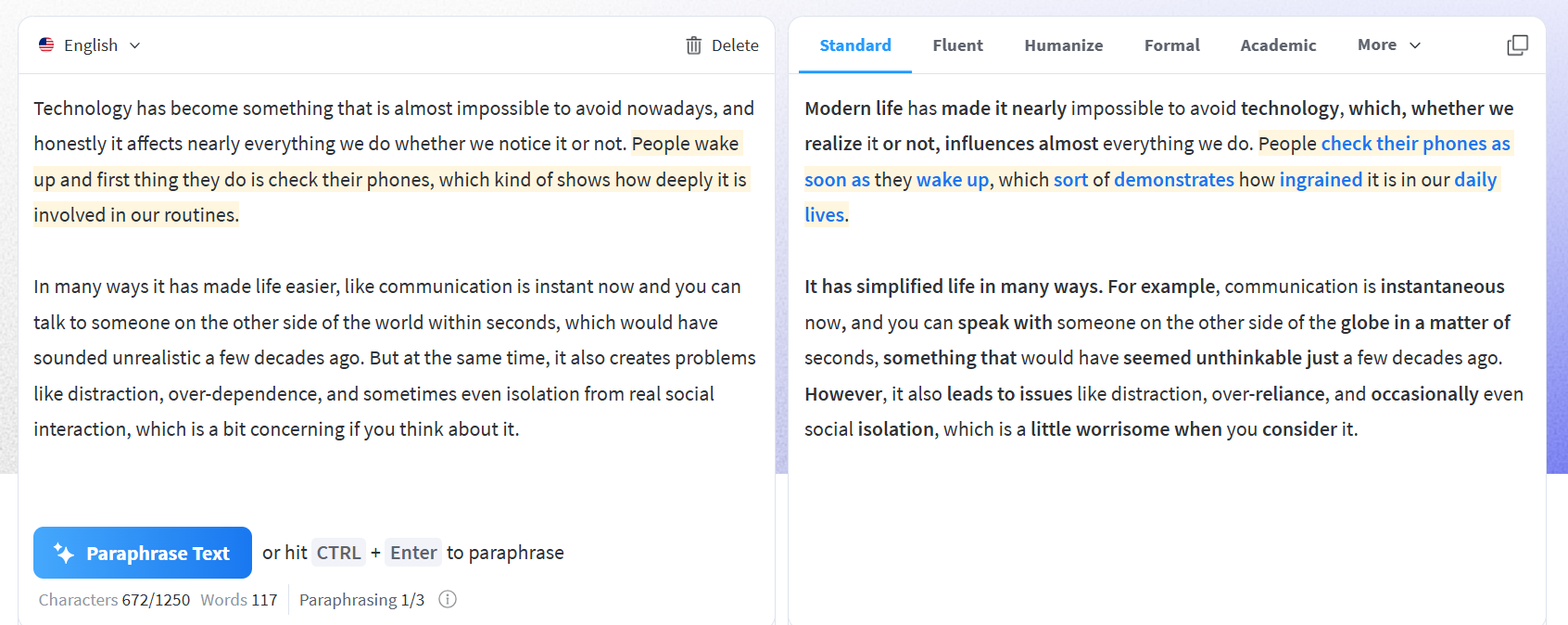
Features | Editpad | LanguageTool |
Preserves Actual Meaning | ✔️ Yes | ✔️ Yes |
Working | ✔️ Big changes | ❌Small changes |
Paraphrasing modes | ✔️ 12 modes | ❌ 10 modes |
Highlights Changes | ✔️ Yes | ✔️ Yes |
Multilingual | ✔️ Over 35 languages | ❌ Only 6 languages |
Free Version | ❌ Rephrase up to 1000 words | ✔️ Rephrase up to 1200 words |
File Support | ✔️ Paste & upload (PDF, TXT, or DOCX) file | ❌ Paste text only |
Based on the feature and performance comparison, Editpad wins in paraphrasing. It offers more paraphrasing modes than LanguageTool and supports a wider range of languages. Besides these, the paraphrased outputs by Editpad are more refined and natural than those by LanguageTool.
All in all, LanguageTool is suitable for basic paraphrasing tasks. But if you need more flexibility, wider language support, and higher-quality paraphrases, Editpad is a better choice.
Editpad is mainly a web-based platform and has limited integrations.
However, LanguageTool provides wider accessibility as it comes with:
Browser extensions (Chrome, Firefox, Edge)
MS Word integration
Google Docs support
Desktop and mobile apps
This enhanced integration of LanguageTool across different programs makes it a convenient platform for daily professional use.
While both platforms come with grammar checking and paraphrasing capabilities, Editpad goes a step further by providing a wide list of additional tools. These tools make it a one-stop solution to cope with different needs.
Here’s a brief breakdown of Editpad’s popular tools:
AI Text Generator to instantly generate content on any topic. You can generate personalized messages, articles, blogs, or social media posts within a few seconds.
Text Summarizer helps you easily summarize long articles, research papers, and more, while preserving all the key points.
AI Detector lets you check whether a piece of content is AI-generated or human-written.
AI Essay Writer is useful for generating personalized essays on various topics for all academic levels.
AI Email Writer allows users to quickly compose new emails or reply to emails. Plus, it supports different email types and tones.
AI Answer Generator by Editpad generates precise and tailored answers for any question.
The list of tools doesn’t end here; there are several other useful AI writing tools and utilities by Editpad to streamline your different tasks.
Editpad is a versatile platform that caters to the needs of different users. Its common users include: writers, students, proofreaders, marketers, and professionals who need help in content creation, paraphrasing, summarization, grammar checking, and other writing-related tasks.
Additionally, Editpad can be useful for data-entry professionals, as it provides tools such as Image to text, Text to PDF, and JPG to Word converters that help streamline data entry workflows.
With its wide collection of tools, Editpad is the best choice for users searching for an all-in-one writing and productivity solution.
LanguageTool is suitable for international writers, multilingual teams, and bloggers who create content in multiple languages, offering accurate grammatical and style corrections. Plus, it is ideal for users who want enhanced accessibility and need to check grammar and refine writing directly in MS Word, Google Docs, and other platforms.
As per our detailed comparative analysis of both platforms, we’ve come to the conclusion that Editpad is a better option.
Here’s a summary of key reasons:
Editpad gives access to a more comprehensive set of tools.
We found most of Editpad’s tools to be accurate and feature-rich.
Its user interface is simple, straightforward, and easier to navigate
Its paraphraser and grammar checker tools give you more flexibility.
In addition to writers, it offers useful tools for marketers, researchers, and data-entry professionals.
Editpad’s tools are more dynamic and versatile than those of LanguageTool.
However, it doesn’t mean that LanguageTool lacks value. It is still a good option for grammar and writing style correction, and especially helpful for users who work in different languages.









 Editpad
 Premium

 Chat Online
