Editpad vs. Grammarly: A Comparison Between Their Key Tools
Editpad vs. Grammarly: A Feature Comparison
What Are the Similarities Between Editpad & Grammarly?

The rise of AI writing tools has greatly changed the way we create content. These tools are now widely used to improve and streamline the content writing process. Among the many AI tools available, Editpad and Grammarly are the two big names. Both help users to overcome different writing challenges and improve content quality.
Many users find it hard to decide which one is more helpful for them. To make it easier, we created this blog. Here, we have compared the tools offered by Editpad and Grammarly. Alongside this, we’ve outlined the similarities and differences between them to help you choose the right AI writing assistant.
Let’s break it down…
Editpad was primarily built as an online notepad. Over time, it has added various other tools, especially related to writing tasks. Now, editors, content writers, marketers, and professionals utilize it as a companion to improve and streamline their writing tasks.
All of its tools are designed simply and feature-rich in order to meet the maximum needs of users. For a clear picture, we have reviewed and tested each of its key writing tools individually to see if they are worth it.
Grammarly is a popular tool for ensuring accurate grammar. Like Editpad, it was also built with a single tool named a grammar checker, which detects and fixes errors related to spelling, punctuation, and grammar.
Grammarly has also changed into a one-stop solution, providing different tools for marketers and writers.
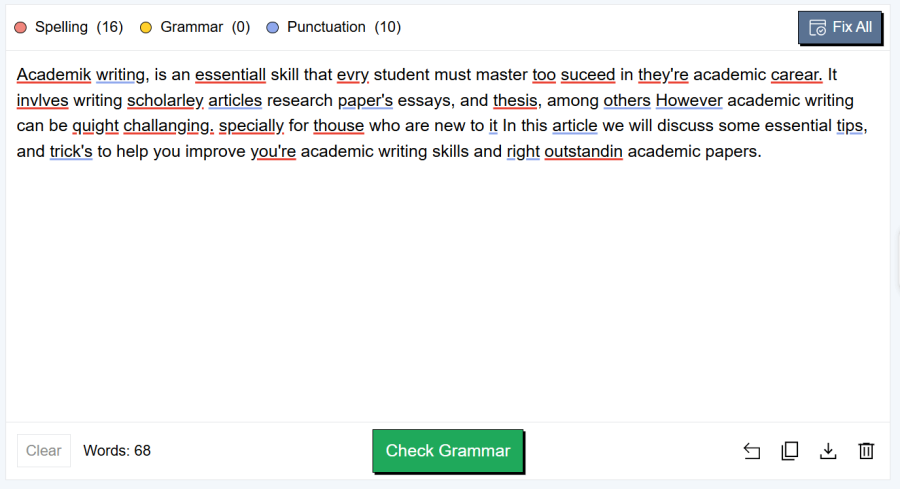
Editpad’s Grammar Checker uses different colors to spot grammar and spelling errors. This makes it easier for you to identify your mistakes quickly and fix them without any confusion.
You can either accept the suggestion one by one manually or simply click the “Fix All” button to automatically correct all mistakes.
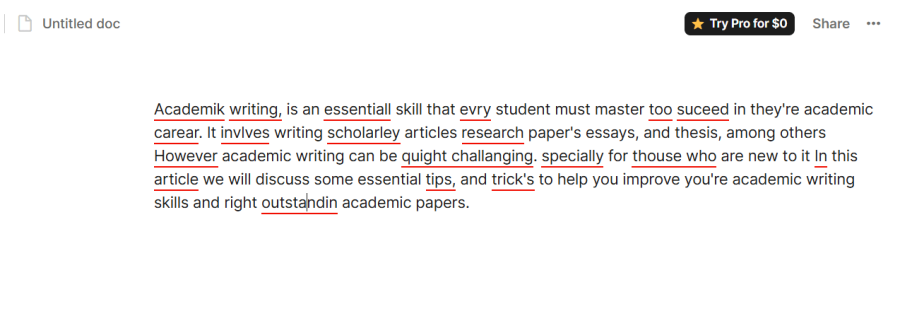
Now, let's turn to Grammarly; its grammar checker is also accurate and detects nearly all grammar, punctuation, and spelling mistakes. To use Grammarly, you first need to sign up. Although it provides accurate suggestions, there is nothing like the option to “Fix All” mistakes at once, and users have to review and fix each suggestion one by one manually, which feels time-consuming, especially when you have a long text to fix.
How Each Tool Performed in Our Testing:
We tested both grammar checkers with the same text containing 26 errors. Editpad pointed out all 26 errors. On the contrary, Grammarly could find only 20. This shows that Editpad works accurately in detecting errors, while Grammarly missed some mistakes in the same test.
Editpad’s Result:
Grammarly’s Result:
Related Topic: Editpad vs. LanguageTool
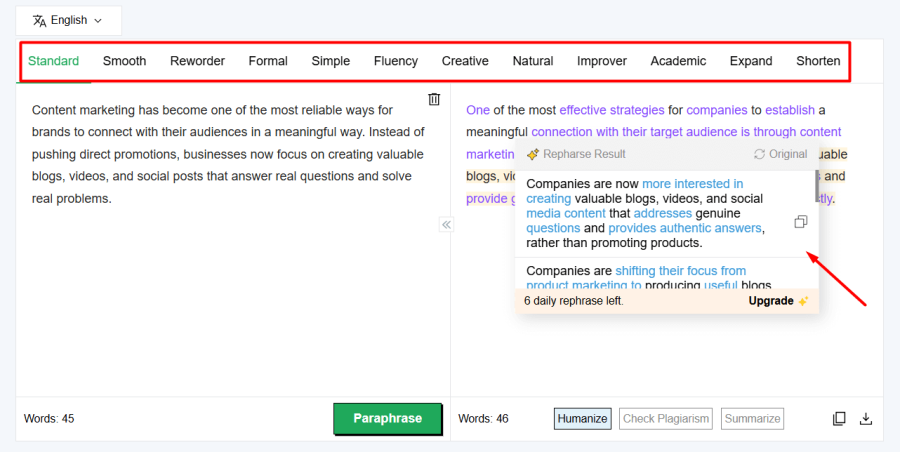
Editpad’s Paraphrasing Tool lets you rephrase text in 12 different writing styles, including academic, professional, and creative.
Grammarly also offers a paraphraser. It refines the wording and sentences, but doesn’t offer paraphrasing modes. You can’t modify the content’s tone to match your audience. Both tools allow paraphrasing text in multiple languages.
Performance Result from Our Test:
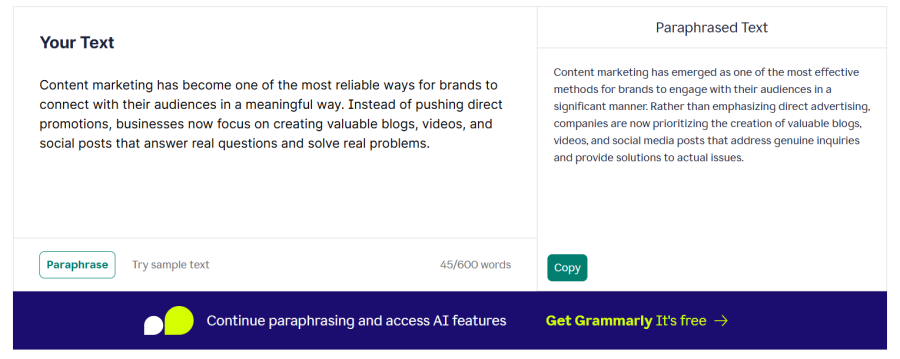
We paraphrased a sample text using both tools. Editpad refined the overall fluency, restructured sentences, and enhanced the readability. However, Grammarly just replaced words with their synonyms without doing any structural refinements. Plus, some of the words used by Grammarly were relatively difficult to read.
Editpad’s Output:
Grammarly’s Output:
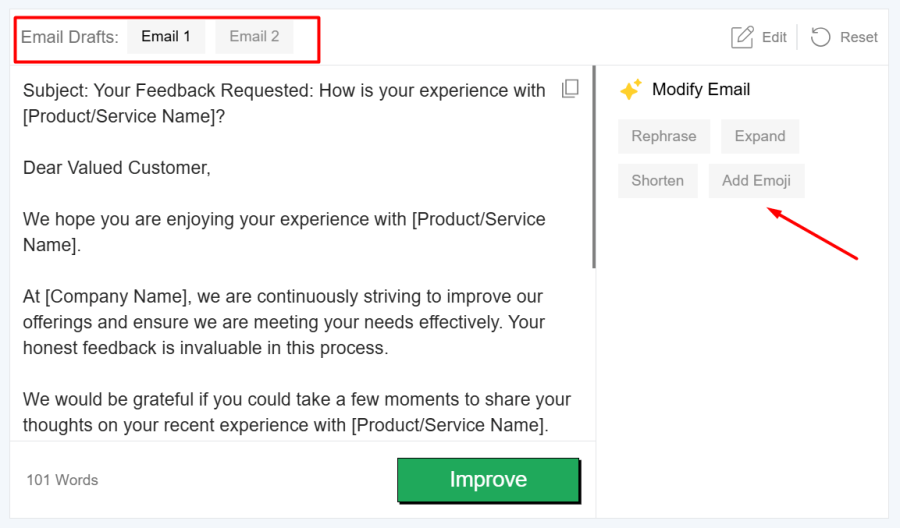
Let’s compare the email writers of both platforms. Editpad’s AI Email Writer is a one-stop solution to generate any type of email. We found that Editpad lets users specify the email type, writing style, and key points, while Grammarly’s Email Writer doesn’t offer such features. To generate emails with Grammarly, we needed to write all the requirements manually, which took up a lot of our time.
Additionally, Editpad offers more flexibility by allowing users to add emojis, expand the email, or shorten it. Grammarly, on the other hand, lacks these features.
How Each Tool Performed in Our Testing:
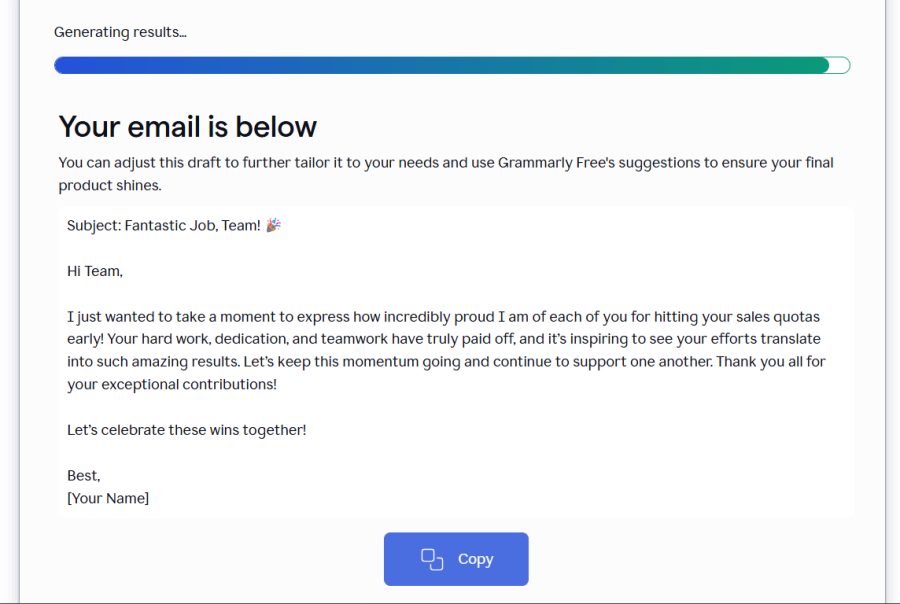
Both tools performed accurately in our testing. However, Editpad’s Email Writer provided a more natural and clear output. In contrast, Grammarly generated a robotic-sounding email and used some jargon words as well, as you can see in the demonstration below.
Editpad’s AI Email Writer:
Grammarly’s Email Writer:
Editpad’s and Grammarly’s Text Humanizers refine AI content to make it sound human-like and more authentic. Both offer accurate humanization without losing the key points.
However, Editpad offers something more; it enhances overall content quality. Plus, its humanizer lets you humanize content in two different styles: Basic & Advanced.
Grammarly wins in word count as its free version can humanize 2000 words at once, while Editpad’s free tool processes only 400 words at a time.
How Both Tools Performed in Our Test:
We ran the same AI-generated text through both the tools and then checked the output of each using the ZeroGPT AI detector.
Editpad's AI Humanizer:
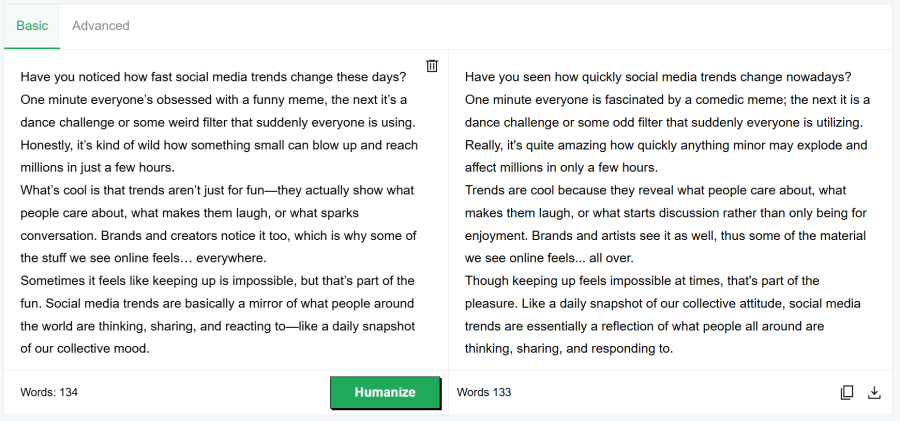
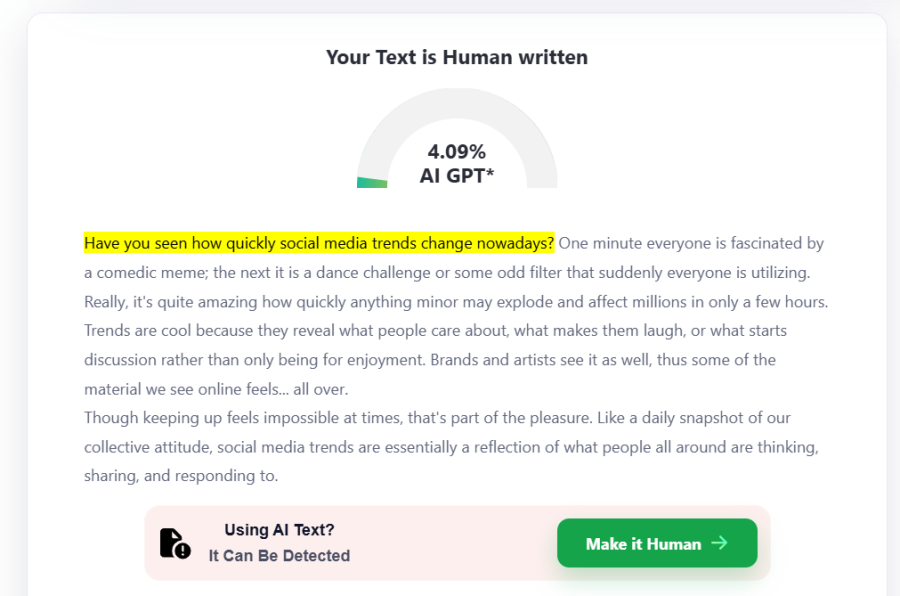
Editpad humanizer made significant changes to the content and refined its overall flow and tone. When we tested the output with the ZeroGPT, only 4% of the text was highlighted as AI. So, Editpad fully humanized almost all the AI content.
Humanized Content By Editpad:
Checking the Editpad’s Output:
Grammarly Humanize AI text tool:
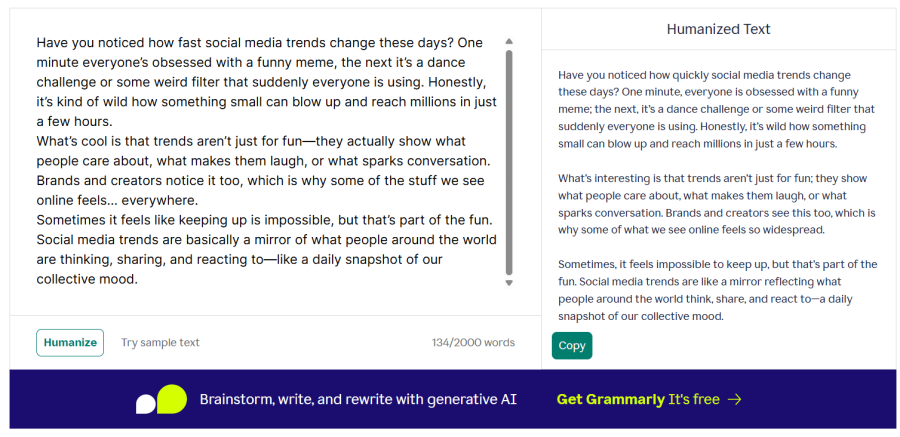
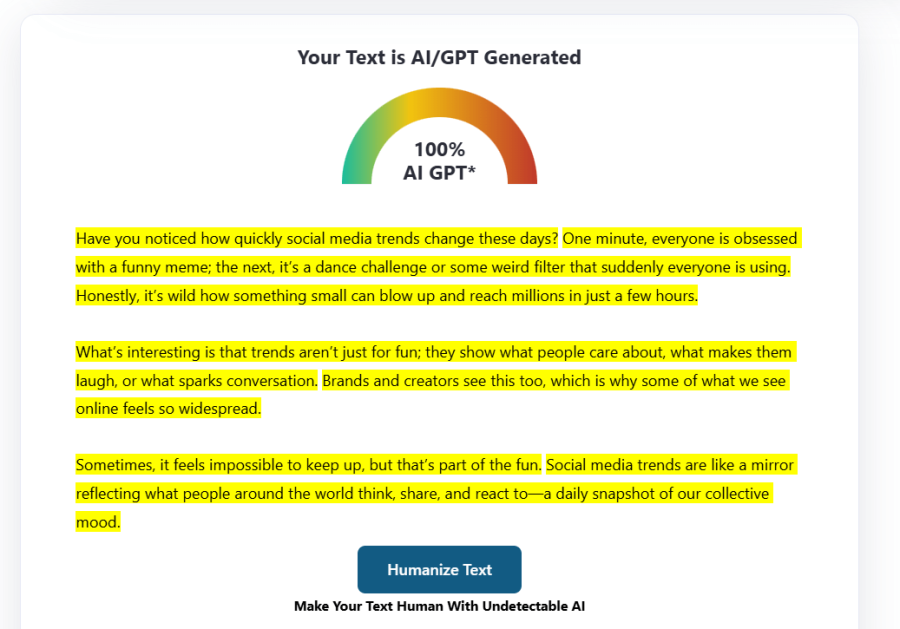
Grammarly acted like a paraphraser, as it changed just a few words. Additionally, when we checked its output via ZeroGPT AI detector, it flagged it as 100% AI, as shown below. So, Grammarly’s humanizer failed to humanize AI content.
Humanized Content By Grammarly:
Checking the Content Humanized by Grammarly:
Both AI detectors from Editpad and Grammarly help identify AI-generated content. Editpad offers a detailed analysis with AI-generated and human-generated percentage scores, while Grammarly only provides an AI detection score without highlighting AI phrases.
Performance Results from Our Test:
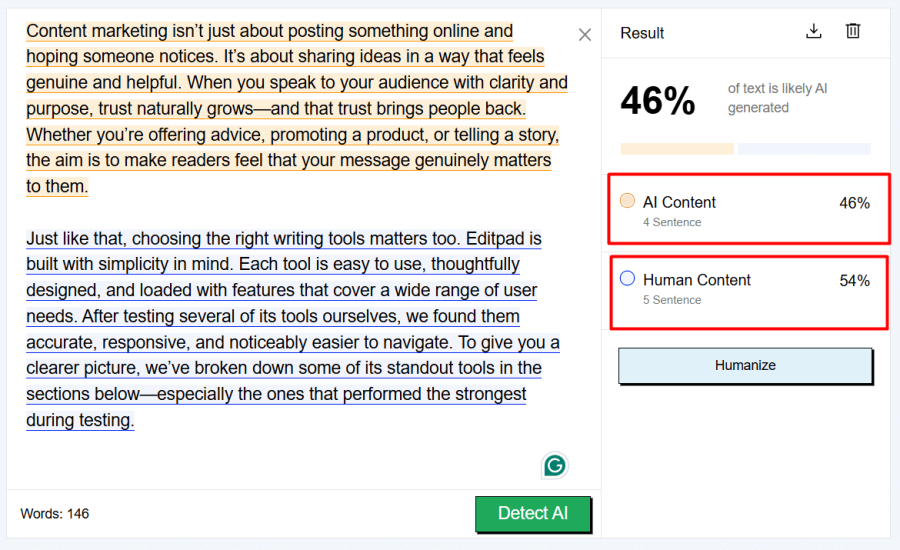
To test both AI detectors, we used a text that contained a mix of AI and human-written content.
Editpad’s AI Detector:
Editpad detected 46% AI content and provided a detailed report. It clearly highlighted the AI-generated and human-written content sections using different colors, which made the analysis transparent.
Grammarly’s AI Detector:
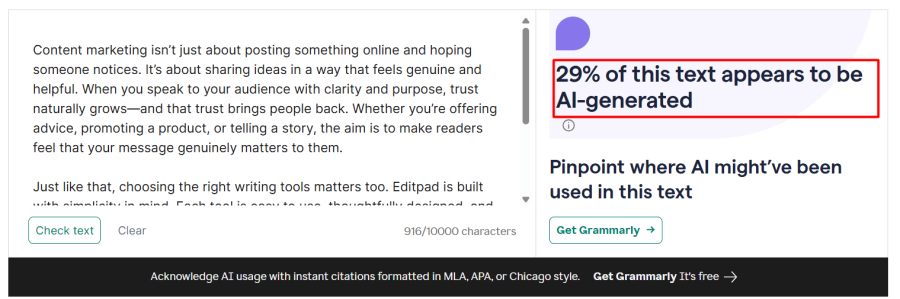
Grammarly’s AI Detector showed an unclear report. It just detected the 29% AI content, but it didn’t specify which sentences were AI-generated and which were human-written.
As shown below:
The text summarizers of both Editpad and Grammarly work fast. Some other features are also similar in both, like output options and availability of the free version.
But Editpad’s Text Summarizer comes up with multiple other options to give users the best summary. It allows personalizing summary length by just moving the length slider, which Grammarly doesn’t. Additionally, Editpad’s free summarizer has a 3000-word limit; on the contrary, Grammarly just has 3000 characters.
Editpad’s Text Summarizer offers two summarizing modes: AI Summarizer and AI Summarizer Pro. The first one is available to free users, while the second mode is accessible through a premium subscription.
How the Tools Performed in Our Test:
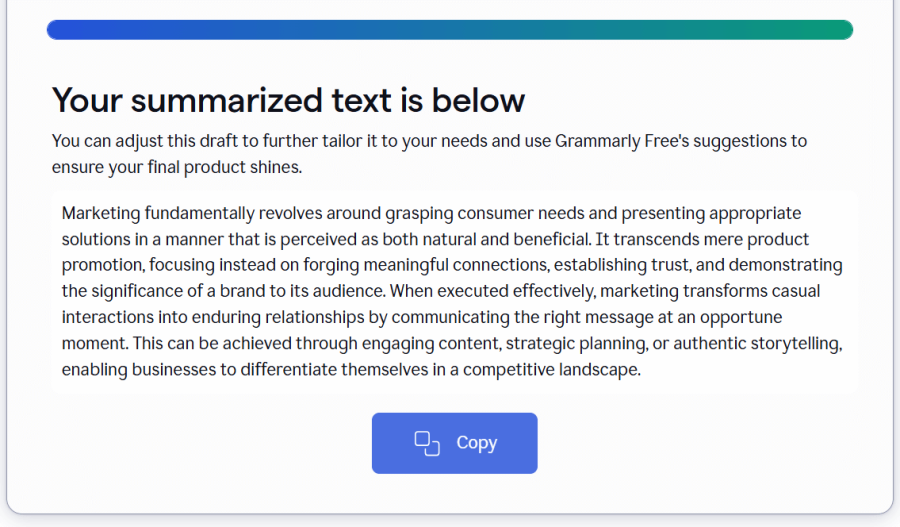
We entered the same 78-word text into both tools. Editpad’s Summarizer condensed it to 32 words without losing any of its keywords. Grammarly’s result was unexpected; instead of shortening our text, it expanded it from 78 words to 85 words.
Also, we didn’t find any option to refine the result, whereas Editpad gave us output in side-by-side comparison and allowed us to edit the output.
Editpad’s Text Summarizer: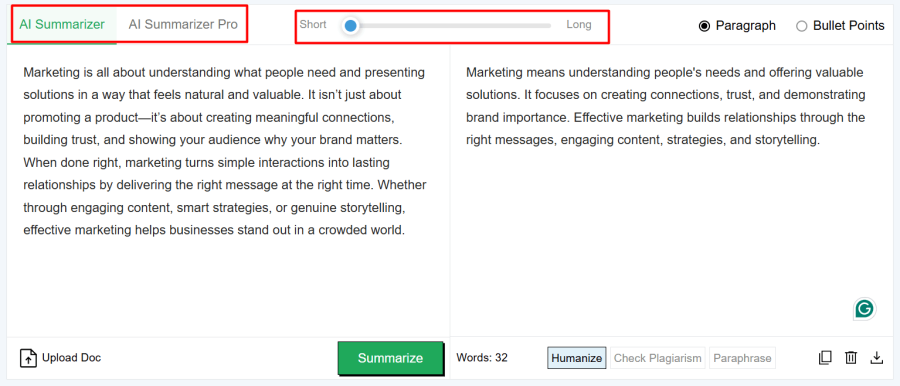
Grammarly’s Text Summarizer:
For quick review, read the feature comparison below between the main tools of Editpad and Grammarly.
Features | Editpad | Grammarly |
Grammar Checking | ✔ Freemium ✔ No sign-up required ✔ Fix All Errors in one click ✔ Supports multiple languages ❌Just checks grammar errors & doesn’t refine sentences. ❌Doesn’t have any extension | ✔ Freemium ❌ Need to sign up ❌ Manually fix each error ❌ Supports only 5 languages ✔ Refines sentences as well ✔Offers Chrome Extension |
Paraphrasing | ✔ Accurate rephrasing ✔ 12 paraphrasing modes ✔ Highlights changes ✔ Supports 17+ languages | ✔ Paraphrases accurately ❌ No modes ❌ Doesn’t highlight changes ❌ Supports 5 languages |
Email Writing | ✔ Select desired email type ✔ Provides two email drafts at once ✔ Adjustable writing tone ✔ Adds emojis | ❌Doesn’t have email personalization options ❌Requires more manual efforts |
Humanize AI Text | ✔ Humanizes & refines AI content ❌Free version is limited to 400 words at a time | ❌Just focused on humanization ✔ Free version humanizes 2000 words at a time |
AI Detection | ✔ Highlights AI content in both free & paid versions ✔ Shows AI percentage | ❌Doesn’t highlight AI sections in the free version ✔ Shows the probability of AI in percentage |
Summarizing Tool | ✔ Adjustable summary length ✔ Editable output ✔ Accurate summarization ✔ Shows input & summary side by side for comparison | ❌Doesn’t offer any option to specify the summary length ❌You can’t edit the results ❌Working is not accurate |
Both Editpad and Grammarly are similar in various aspects, including:
Offering Freemium (Free & Paid versions)
Processing content faster to save users’ time.
Convenient to use without any challenge.
Wide range of AI writing tools.
Here are the main differences between the Editpad and Grammarly that we found after their careful analysis;
Editpad supports 20+ different languages, while Grammarly supports only 5 languages.
Grammarly’s tools don’t provide customization options, while almost all of Editpad’s tools have options to customize results.
Editpad allows instant access to all of its tools, while Grammarly requires a sign-up to access some of its prominent tools.
Editpad provides users with side-by-side comparisons, highlights changes, and uses colors in the output. It helps users easily understand the result. None of these features is offered by Grammarly.
Grammarly is just focused on writing tasks, whereas Editpad offers a wide range of utilities beyond writing. For instance, Editpad offers QR Code Scanner, Image to Text, Invisible Character, Text to PDF and more.
The answer to this question depends on the specific needs that vary from person to person. However, as per our review of both platforms, we found Editpad to be a better choice than Grammarly. Here’s the recap of reasons:
Editpad’s tools are more accurate at working as compared to those of Grammarly.
It caters to more users' needs.
It gives a convenient experience to users.
We found a wide range of advanced features at Editpad.
All of its tools come with some additional benefits.
Each tool by Editpad comes with higher free limits.
Hence, we confidently conclude that Editpad is a more helpful tool for writing than Grammarly.








 Editpad
 Chat
Chat
 Premium

